
Business
SaaSSwitcher SaaS spend calculator: Build a reliable software budget
Learn what SaaSSwitcher’s spend calculator measures, how to enter subscriptions, and how to check totals against your invoices.

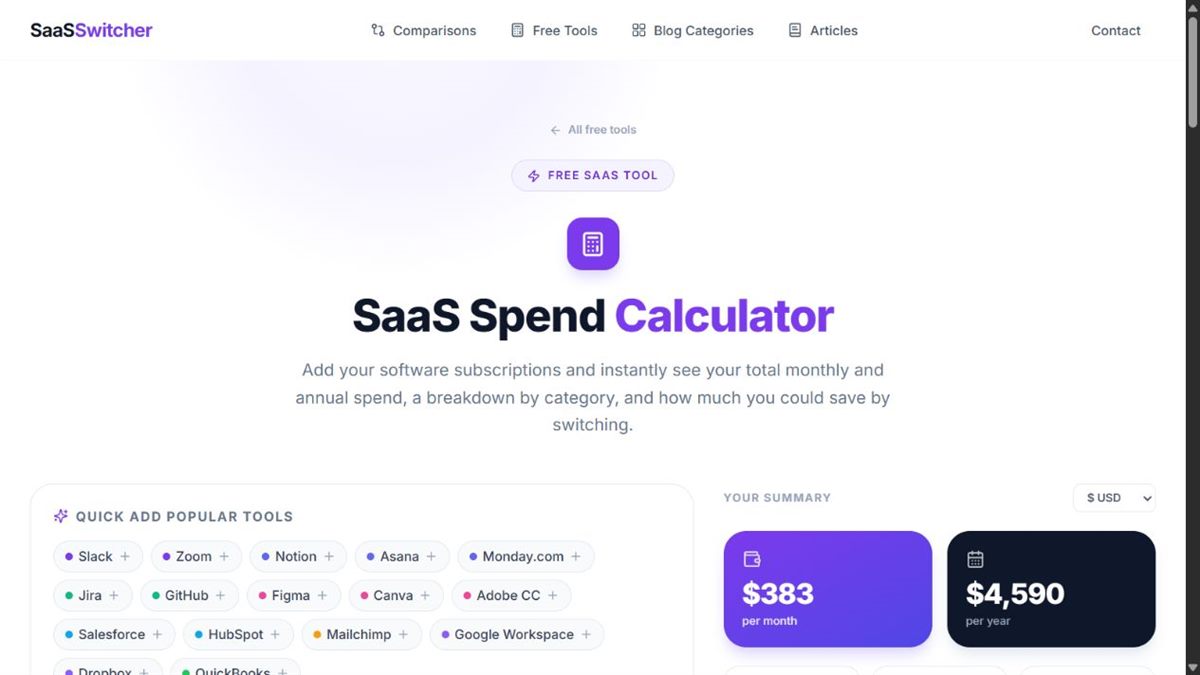
The SaaSSwitcher SaaS spend calculator adds software subscriptions into a monthly and annual estimate. It also displays a category breakdown, the number of paid seats entered across subscriptions, and an average cost per seat. Its usefulness depends on replacing sample prices with the amounts and billing terms on your own invoices.
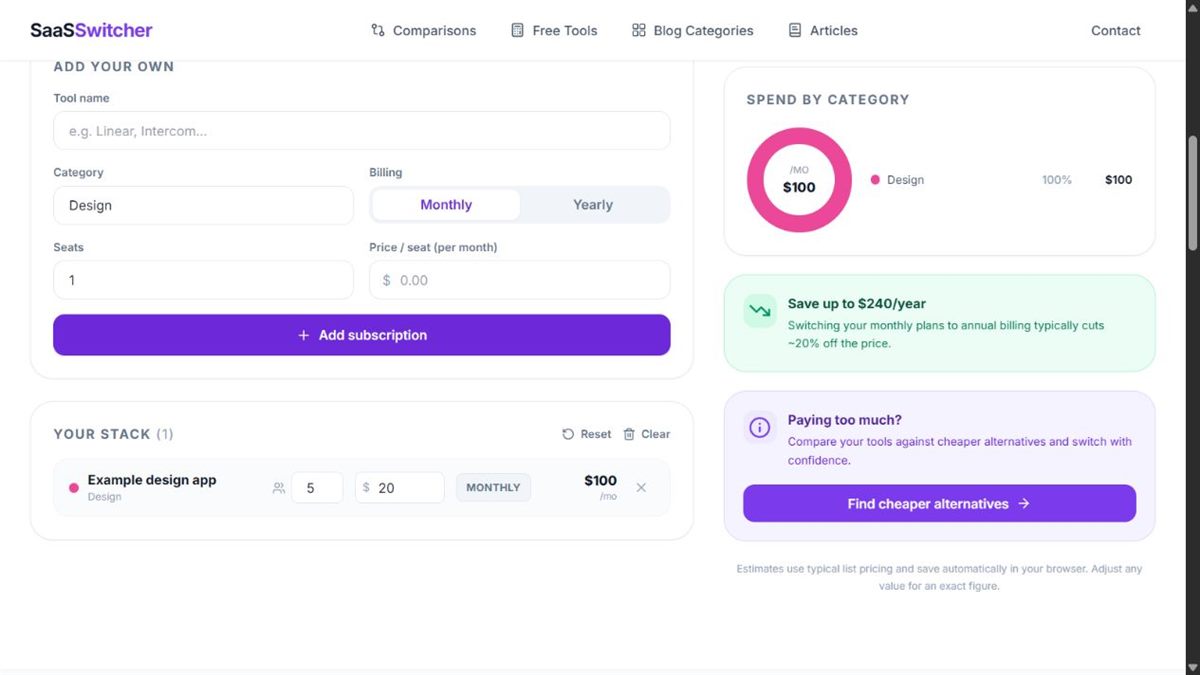
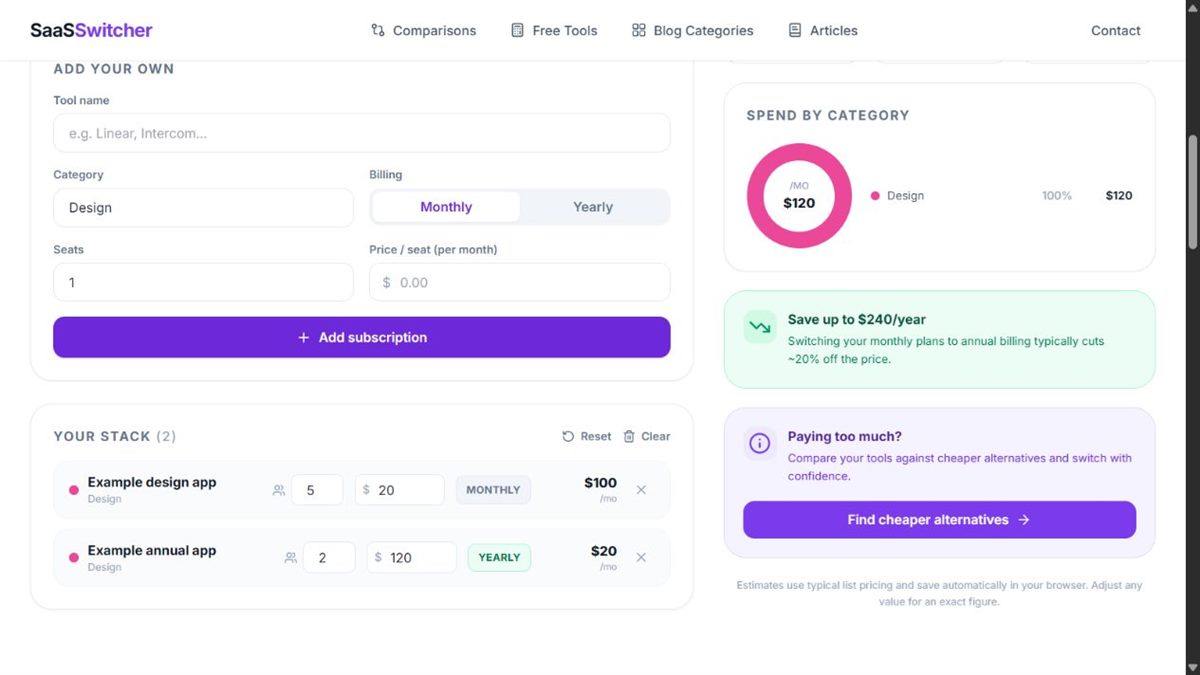
During a browser check on November 18, 2026, a sample subscription with five seats at $20 per month produced a $100 monthly total and a $1,200 annual estimate. Adding a second example with two seats at $120 per year increased the monthly equivalent to $120 and the annual estimate to $1,440. These were test entries, not vendor quotations.
What the calculator measures
The page provides quick-add buttons for named software products and a form for entering your own subscription. The custom form includes a tool name, category, billing cycle, seat count, and price per seat. You can adjust an existing entry or remove it from the stack.
The summary changes as the inputs change. This makes it convenient for a first inventory or a simple budget comparison. The page also says entries save automatically in the browser. Treat that as a convenience, and keep an independent record of the subscription inventory and source invoices.
The tool is separate from SaaSSwitcher’s ROI calculator and its switching comparison tools. A spend total tells you what a stack costs under the entered assumptions. It does not tell you whether employees use the software well, whether an alternative will replace every function, or whether a migration will pay for itself.
Prepare a subscription inventory first
Gather invoices and subscription settings before entering numbers. A product’s public starting price may differ from your plan, negotiated rate, or region. Separate the base subscription from usage charges and optional services so you can tell what each number represents.
| Field to record | Why it matters |
|---|---|
| Product, workspace, and owner | Separates accounts and identifies who can approve a change |
| Billing currency and tax treatment | Prevents unlike amounts from being combined silently |
| Paid seats and unit price | Explains the recurring subscription calculation |
| Commitment and payment frequency | Distinguishes an annual obligation from monthly cash payments |
| Renewal and notice dates | Shows when a decision must be made |
| Usage or add-on charges | Identifies costs that a simple seat estimate may omit |
Use consistent names. Two entries called “design” may represent separate team accounts, or they may be the same invoice entered twice. Include enough detail in your private inventory to reconcile them, while avoiding account credentials and other unnecessary sensitive information in a public calculator.
Enter the billing period carefully
The custom form changes its price label when you choose yearly billing. Enter the price for the period the label requests. A $120 annual price per seat represents $10 per month per seat when spread across twelve months. Entering $120 into a monthly field would produce a very different estimate.
Check a small example before adding an entire stack. In the browser test, the annual example used two seats at $120 each per year. The calculator displayed $20 per month for that subscription, matching $240 divided by twelve. The first monthly example remained $100 per month.
A monthly equivalent is useful for comparing subscriptions on the same basis. It does not describe when money leaves the bank. An annual invoice can be payable upfront even though your planning sheet spreads the amount across the year. Keep a separate payment calendar if cash timing matters to your team.
Read the seat total correctly
The tested stack displayed seven seats: five in the design example and two in the annual example. That is a sum of subscription seats. It does not establish that the organization has seven different employees. The same person could hold a license in both products.
The $17.14 per-seat result was the $120 monthly equivalent divided by seven entered seats, rounded to cents. This average can describe the entries, but it should not be called total software spending per employee unless you use a separate, accurate employee count.
For a per-employee measure, decide which costs belong in the numerator and which people belong in the denominator. Contractors, shared accounts, and service accounts can complicate the comparison. Document the choice so next month’s number is calculated on the same basis.
Check the savings estimate against real offers
The page displayed an estimated annual-billing saving using an approximately 20% assumption. That is not evidence that every vendor offers that discount, that your contract permits an immediate switch, or that the same seats will be needed throughout the commitment.
Obtain the actual monthly and annual quotes for the same plan and seat count. Compare their full commitment cost, cancellation terms, and payment schedule. If an annual offer has a discount but locks the team into unused licenses, the lower unit price may not solve the budget problem.
Use a proposed saving as a question to investigate: which subscriptions have a documented annual option, which can be reduced at renewal, and which are already on discounted terms? Keep confirmed savings separate from estimates until the change is approved and the bill reflects it.
Handle currency, taxes, and variable charges separately
The interface offers a currency selector. Choosing a symbol is not enough evidence that an entered amount has been converted using an exchange rate. Keep all inputs in one currency unless the tool explicitly shows a conversion method and you have checked it.
Choose whether the inventory includes or excludes tax, and apply that convention consistently. If tax treatment differs across invoices, retain a separate column for reconciliation. A clean subtotal that omits a real expense can still be an incomplete budget.
Usage-priced services need their own assumptions. You might prepare a recent actual month and a separate planning scenario, clearly labeled. Do not enter a seat price to represent variable usage unless you explain that substitution in your own records. It can make a forecast look more certain than it is.
Turn the inventory into a review process
Ask each subscription owner what the product supports, who uses it, and what would break if it were removed. Compare overlapping tools by the work they must perform. Two products in the same category may still have different security requirements, integrations, or export capabilities.
Before reducing a license count, check how the vendor counts active or billable users and when reductions take effect. Before canceling, identify the data export, retention, and access steps the team needs. The spend calculator cannot make those operational decisions.
Keep a short decision record: retain, reduce, replace, or investigate, with an owner and a renewal date. Our guide to spreadsheet habits that undermine business dashboards provides related context for keeping the underlying numbers consistent. More planning articles are available in Business.
Reconcile the result before using it in a budget
Compare the calculator’s total with the invoices represented by the inventory. Investigate differences rather than rounding them away. A missing workspace, annual charge, or add-on can explain a gap that looks small on one subscription and material across the stack.
Save the date and assumptions with the result. If prices, seats, or exchange rates change, the old total remains a record of an earlier scenario. It should not silently become the current approved budget.
For general purchasing precautions, the FTC’s online shopping guidance explains the value of reviewing terms and keeping purchase records. For software, retain the order form and renewal conditions alongside the invoice.
Frequently asked questions
Is the SaaSSwitcher spend calculator a full accounting system?
No. Its visible function is a subscription estimate. Keep invoices, payment records, approvals, and accounting treatment in the systems your organization uses for those purposes.
Are the quick-add prices guaranteed current?
The page describes them as typical list pricing. Replace them with a current quote or your actual invoice before relying on the result.
Does the seat total equal the number of employees?
No. The tested interface added seats across products. One employee can account for more than one paid seat in a software stack.
Should annual billing always be chosen?
Compare the documented discount with the commitment, payment timing, and expected need for the seats. The calculator’s assumed saving does not decide that tradeoff.



Best Wireless Earbuds Under $200 in 2024: 7 Top Picks for Sound, ANC and Battery Life

Heather Arranie on HealthSciencesForum: How to find and read the articles

Best Shapewear for Desk Jobs: What Doesn’t Dig In, Roll Down or Show Through After Eight Hours

BacktoFrontShow pricing: What Basic, Pro and Enterprise cost

Tech On Dicas: Which site are you looking for?
-

 Business2 months ago
How to Choose an Ergonomic Office Chair for Women That Actually Fits
-

 Entertainment2 months ago
Top Movies and TV Shows in the US: JustWatch September 2026 Streaming Charts
-

 Home Improvement2 months ago
5 Best Indoor Air Quality & Mold Companies in Houston (2026)
-

 Tech2 months ago
The Spreadsheet Habit That Quietly Breaks Business Dashboards as Teams Scale